Free · No card · Nothing to resync, ever
SutrahPrayer times in Google Calendar and Outlook, placed around your meetings.
Sutrah is a prayer calendar app for working Muslims. It syncs salah times to Google Calendar and Outlook, then places each prayer block in real free time inside that prayer's valid window so meetings do not land on top of salah, and moves the blocks when your day changes. On Apple Calendar, a simple feed carries the same times.
- Reads busy times, never your email
- Only touches events it created
- Times from the open-source adhan library
- Security brief for your IT team
- Google Calendar
- Outlook
- Apple Calendar(feed)
Not ready to connect a calendar? These work without an account.
You do not miss salah because you forget.
You miss it because the day was booked by someone else.
- 01
Prayer apps remind you. They do not protect the time.
- 02
Your real life runs on a calendar, and colleagues book whatever looks free.
- 03
A fixed block lands on top of the standup, so you decline it, then ignore it.
- 04
Times shift every single day, so any manual schedule is wrong within a week.
- 05
You end up rushing the end of the window, or making the prayer up later.
Why a fixed block never held.
Most tools drop a repeating 12:30 event and call it done. That is the version everyone has already tried and quietly abandoned. Here is one week, both ways.
A recurring 12:30 block
On a meeting 3 days of 5
Dhuhr's window, the time it can be prayed
- Fires at the same clock time all year while the sun moves
- Lands on top of the standup, so you decline it or ignore it
- Goes stale the week your team shifts its meeting rhythm
- Tells you nothing when the window has already closed
Where Sutrah puts Dhuhr
On a meeting 0 days of 5
Dhuhr's window, the time it can be prayed
- Recomputed daily from your coordinates and calculation method
- Slides to the open gap inside the valid window, meetings intact
- Re-optimizes on its own when your calendar changes
- Prompts you to log it as prayed or as qada when the window closes
Maghrib moves by four hours. Set this up once anyway.
Salah times swing wildly between winter and summer. Sutrah recalculates every night for your location, calculation method and madhab, so nothing ever needs resyncing.
- Recalculated nightly, a month ahead by default and up to three
- Travels with you, so flights on your calendar are picked up
- Ramadan reshapes the day with suhoor, iftar and taraweeh
Scroll to move through the year.
Prayer times built for the working day between adhans.
Everything here comes from the same starting point: the prayer is fixed, the calendar is not, and you should not have to renegotiate that every week.
Every time you need
Prayer windows, sunrise, Islamic midnight, the last third of the night, and qibla. A whole month, ready to print or export.
Placement that reads the room
The optimizer picks the best open slot inside each window and runs again when someone books over it.
The calendar you already use
Two-way sync with Google and Outlook, a webcal feed for Apple. A month of blocks by default, up to three, marked busy.
Travel that sorts itself out
Flights on your calendar are detected. Times recalculate at the destination, with qasr and jam' notes.
Ramadan and Jumu'ah, handled
Suhoor, iftar and taraweeh reshape the day. Friday uses your masjid's real khutbah time plus a buffer.
A qada ledger, not a guilt trip
Missed a window? Log the makeup in one tap. The ledger tracks it and finds you a slot to pray it.
If your day runs on a calendar, it fits.
The problem is not forgetting. It is a week that fills itself. Whoever books your time, salah should already be on the schedule.
Corporate professionals
Protect salah between back-to-back meetings without a negotiation every week.
Founders and freelancers
Build the day around prayer instead of fitting prayer into whatever is left.
Students
Stay consistent through lectures, labs and the week before a deadline.
Anyone with a full week
Shift work, clinics, site visits, school runs. If it fills a calendar, it fits.
Dhuhr stays valid for hours. The block finds the honest gap.
Tuesday, Chicago
5 meetings, 3 prayers, 0 conflicts
Standup9:00
Design review11:00
1:1 with Sam1:30
Sprint planning3:45
Client call2:30
Opens 11:39
Opens 2:11
Dhuhr
12:20
Asr
3:20
Maghrib
4:37
- 1
Each prayer starts where its window opens.
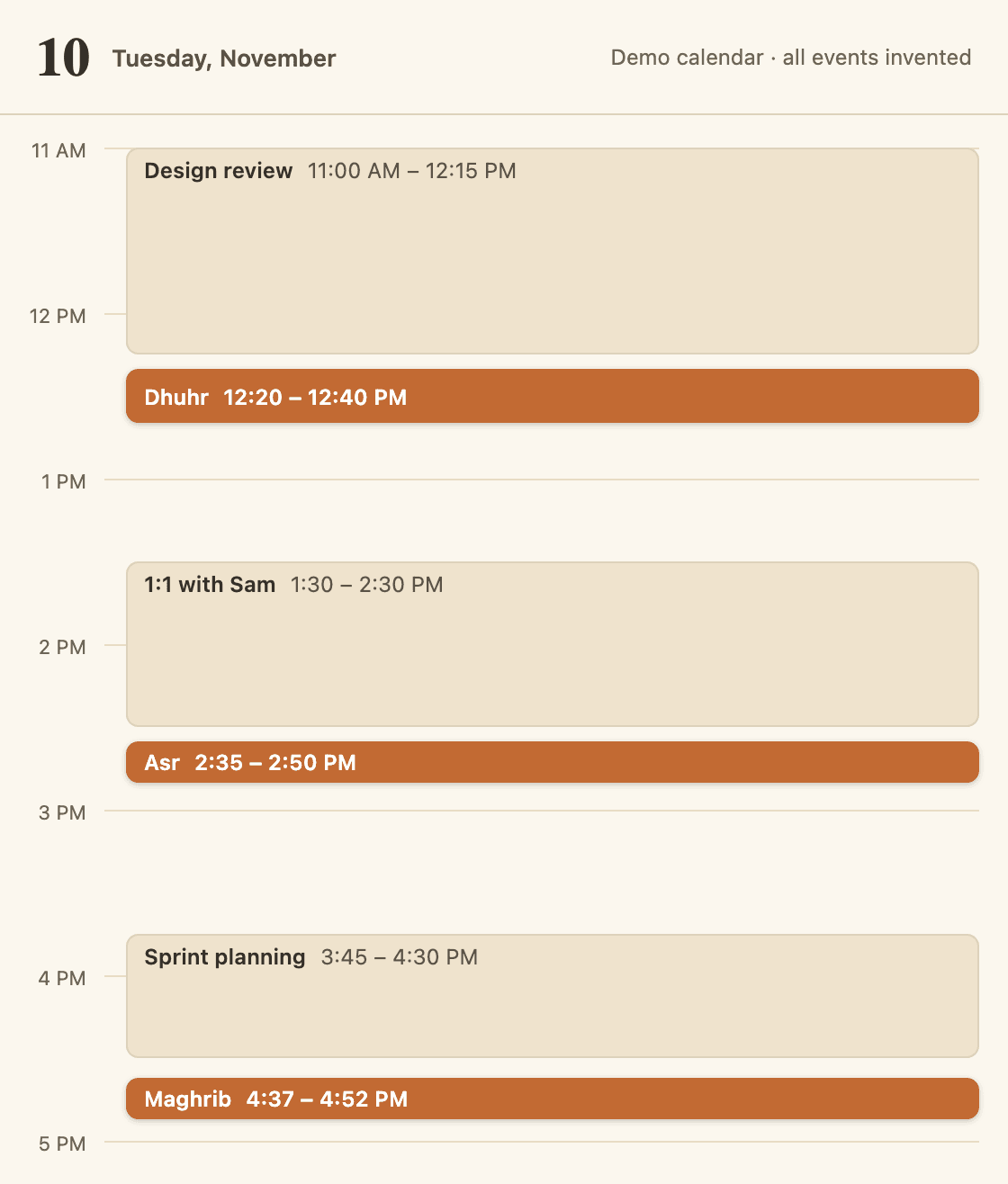
Dhuhr at 11:39, Asr at 2:11, Maghrib at sunset, 4:37. The green rule beside each is the time it can be prayed in.
- 2
A meeting already there keeps its slot.
Design review runs 11:00 to 12:15, across Dhuhr's 11:39 start. 1:1 with Sam runs 1:30 to 2:30, across Asr's 2:11 start. Sutrah never moves or declines your meetings.
- 3
The block takes the next clean gap.
Dhuhr goes to 12:20 and Asr to 2:35, five minutes clear of each meeting and still inside their prayer times. Maghrib stays on sunset.
- 4
Someone books over it at lunch. It moves again.
A client call lands on 2:30 to 3:15, on top of Asr. The clash is caught, and Asr moves to 3:20 without you touching anything.
Two minutes now. Nothing after that.
- 1
Connect your calendar
Sign in with Google or Outlook and smart placement is on immediately. On Apple, subscribe to a webcal feed instead.
- 2
Set location and madhab
Pick where you actually pray. Then tune calculation method, block length and busy status for each prayer.
- 3
Let the blocks land
Every block goes into an open slot inside that prayer's valid window, with a buffer around the meetings on either side.
No daily syncing, no manual updates, no spreadsheet taped to a monitor.
Works with Google Calendar, Outlook and Apple Calendar.
If your work calendar is locked down, the pull-only feed still delivers the times. You lose placement, not salah.
- Live
Two-way sync, conflict-aware placement, instant re-optimization on changes
- Live
Two-way sync, conflict-aware placement, Graph change subscriptions
- Feed
Pull-only webcal subscription that your device refreshes on its own
- Feed
Anything with a URL
Any client that accepts a subscription link, plus CSV export
- Optional
Slack
Status set automatically while you are praying
- Planned
Chrome and Firefox
A meeting guard that warns you before you book over a prayer block. Not in the stores yet.
The email you have been putting off writing.
Four editable templates ship with the app: a short heads-up for your manager, a formal accommodation request that cites the relevant law, and two versions for the wider team. Fill in your name, copy, send.
Not ready yet? Get an email only when something ships.
Questions people actually ask.
What does it read from my calendar?
Event start and end times, so it can tell a free hour from a booked one. Titles are only inspected when travel mode is on, to spot flights. The Google and Microsoft permissions requested are calendar events only, so it has no access to your email.
What do my colleagues see?
A block on your calendar named after the prayer, showing as busy by default. You can rename what appears, set any prayer to show as free, or turn a prayer off entirely in settings.
How do I undo this if I change my mind?
Turn any prayer off in settings and its blocks come off the calendar. If you want out completely, deleting your account also deletes the prayer events it put on your calendar, so you are not left tidying up dozens of entries by hand, and you can export everything as one JSON file first. Nothing about this is a one-way door.
Which calculation methods are supported?
The common conventions including ISNA, Muslim World League, Umm al-Qura, Egyptian and Karachi, plus Hanafi or standard Asr and three high-latitude rules. Times come from the adhan library, and you should still check them against your local masjid.
What if the times do not match my masjid?
Change the calculation method and Asr madhab first, since that is usually the whole difference. If a few minutes remain, every prayer takes its own offset in minutes, so you can line each one up with the masjid exactly. You can also pick your masjid from the directory and have Jumu'ah use its real khutbah time, or anchor daily blocks to its congregation times instead of the calculated ones.
Does it work if I cannot connect a work calendar?
Yes. The webcal feed is pull-only: any client that accepts a subscription URL can refresh it on its own schedule, often about every 12 hours. That includes Apple Calendar and locked-down Outlook. You lose conflict-aware placement, since nothing can read your meetings, but the times and reminders still arrive.
Can I use it only for prayer times and skip the calendar?
Yes, and you do not even need an account. Your city's page gives you today's prayers with their windows, sunrise, the qibla bearing and the whole month; the timetable builder makes a printable PDF for any coordinates on earth; and the subscription builder gives you a webcal link that puts the times on Google, Outlook or Apple Calendar without signing in. Sign in and the times screen adds Islamic midnight, the last third of the night and a qada ledger. Add it to your home screen and it behaves like an app.
Is it really free?
Yes, and there is no card to enter. It exists because praying five times a day around a full calendar is a solved problem that nobody had solved properly.
Put salah on the calendar and leave it there.
Connect Google or Outlook for conflict-aware placement, or subscribe to the feed on Apple Calendar. Free, with no card and no trial that quietly ends.
Change your mind and deleting your account takes the prayer events off your calendar with it. Nothing to undo by hand.
Not today? Get one email when something ships.